

Technical note
Modbus RTU CRC errors: what the capture shows
A CRC failure is easy to see once the frame is decoded. The useful part is telling a bad checksum apart from a bad frame, and knowing which side to inspect first.
Updated 2026-10-30 · Applies to 14.0.0.26002 · 5 min read
A valid read and a bad one
The Modbus view decodes slave, function code, address, quantity and data, and prints the checksum it computed. A frame that fails the check is marked (BAD) instead of being silently dropped.
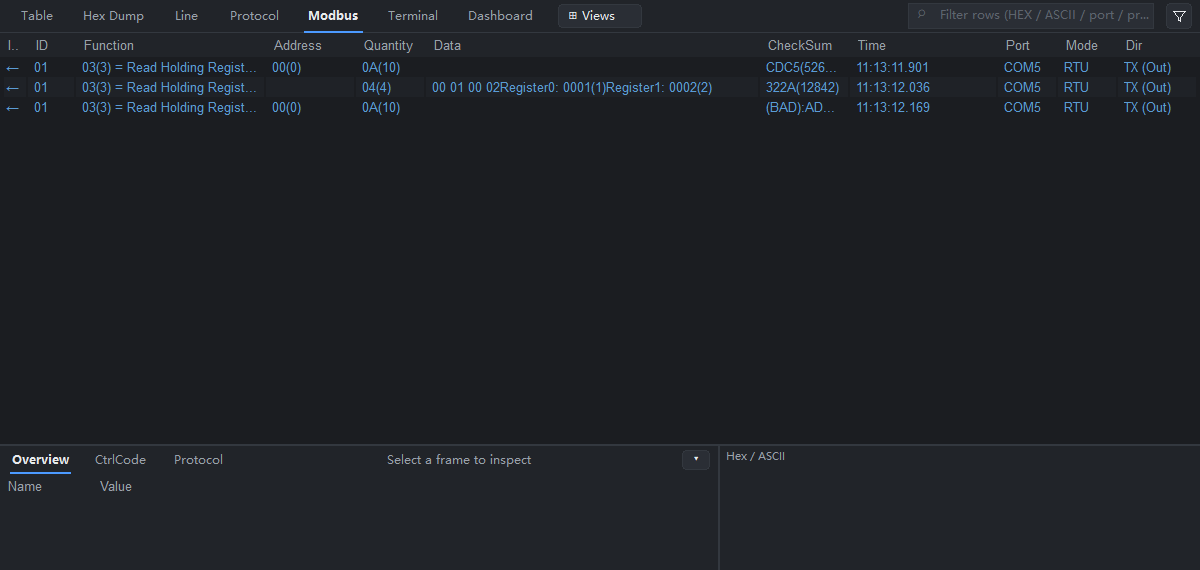
Read the decoded fields, not just the mark
A frame can fail for two different reasons: the bytes are malformed, or the checksum does not match the bytes. The decoder shows both - if the function code and length are plausible and only the checksum is wrong, the problem is usually on the wire or in the transmitter.

Five causes worth checking first
- Baud rate or parity mismatch between master and slave.
- RS-485 wiring: A/B swapped, missing termination, or a floating bias.
- Inter-frame gap: the slave or master is still transmitting when the next request starts.
- Wrong slave address or broadcast reply.
- A gateway or converter that rewrites the frame (RTU-to-TCP bridges are a common source).
What this means in practice
- The decoder marks a checksum failure instead of dropping the frame.
- Compare the decoded fields first; a plausible frame with a bad checksum points at the line, not the protocol.
- Keep the capture next to the device manual - the register map explains what the data should be.