

Technical note
Capture only the control codes you need
A busy port produces a lot of control traffic before the first byte of payload. The IRP filter decides what the driver reports in the first place.
Updated 2026-10-30 · Applies to 14.0.0.26002 · 3 min read
Where the filter lives
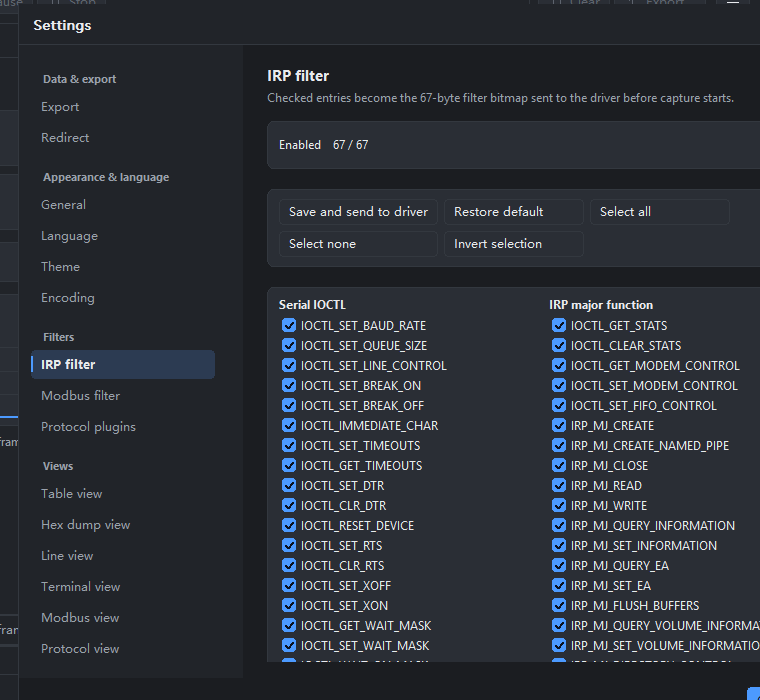
The Settings page lists serial IOCTLs and IRP major functions. Checked entries become a 67-byte bitmap that is sent to the driver when capture starts, so unchecked traffic never reaches the monitor.
What to turn off
If you only care about payload, keep IRP_MJ_WRITE and IRP_MJ_READ and drop the configuration calls. If you are diagnosing a device that fails to open, keep IRP_MJ_CREATE and the line-control IOCTLs - that is where the failure is.
- Payload only: IRP_MJ_WRITE, IRP_MJ_READ.
- Open/close problems: IRP_MJ_CREATE, IRP_MJ_CLOSE, line control.
- Baud-rate problems: IOCTL_SET_BAUD_RATE and the line-control calls.
Apply, do not assume
The setting takes effect when you save and send it to the driver. If the table looks emptier than expected, check the bitmap before suspecting the device.
What this means in practice
- The filter runs in the driver, not in the table.
- Turn off configuration calls when you only need payload.
- Keep create and line-control calls when the device fails to open.