

Technical note
Which process is holding COM5?
When a port is busy, the useful question is not whether it is open but which process opened it. The capture answers that without guesswork.
Updated 2026-10-30 · Applies to 14.0.0.26002 · 3 min read
Read the create record
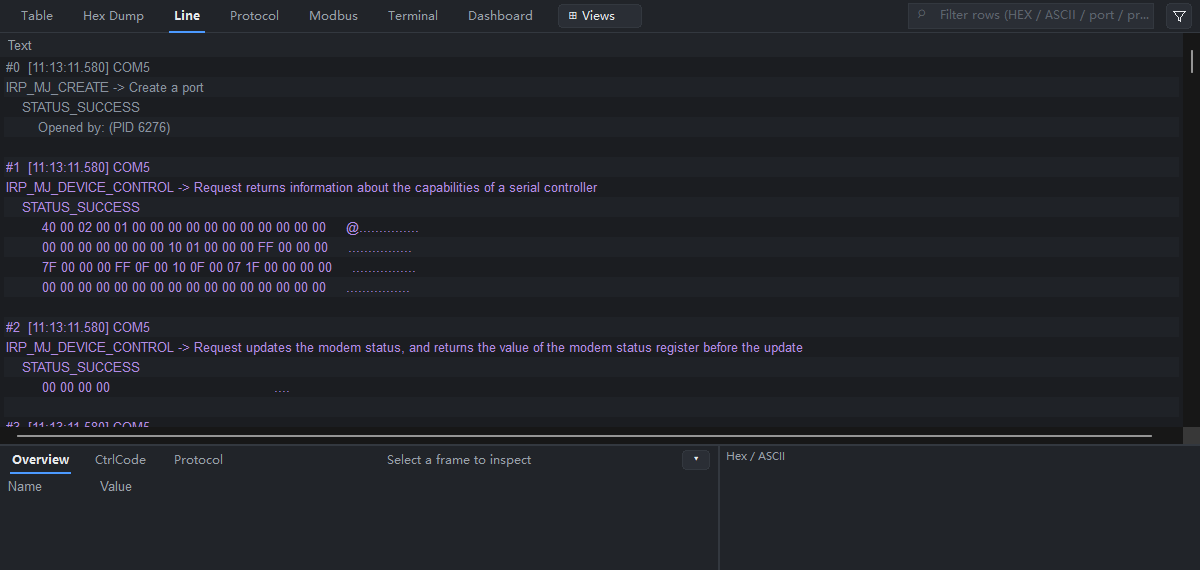
Start monitoring first, then reproduce the problem: launch the software that claims the port. The filter records IRP_MJ_CREATE before the application gets a handle, so even a failed or short-lived open is visible.
In the Line view the record carries the PID of the process that issued it.
Match the PID to a process
Take the PID from the create record and look it up on the machine - Task Manager (Details tab, sort by PID) or Get-Process -Id <pid> in PowerShell. The image name is the answer.
If the PID no longer exists, the open was transient: scroll to the next IRP_MJ_CREATE, or reproduce with the monitor already running.
- Task Manager: Details tab, add the PID column, sort ascending.
- PowerShell: Get-Process -Id 6276 | Select ProcessName, Path.
- Sysinternals Process Explorer: hover the process to see its image path.
Do not confuse the driver with the application
Two different things can make a port busy: an application holding a handle, or a driver attached to the port. The IRP stream distinguishes them - an application produces IRP_MJ_CREATE with its own PID, while a driver shows up as a device or filter layer rather than a user-mode create.
What this means in practice
- The create record is the fastest way to attribute a busy port to a process.
- The monitor does not need to own the port to see the create.
- A PID that has already exited means the open was transient; reproduce with monitoring already on.